A1 A spreadsheet for the browser
Your spreadsheets never leave your device.
8sheets runs entirely in your browser. It opens, edits and saves real Excel files and CSV, with no account, no upload and no server storage.
- No account
- Nothing uploaded
- Works offline

A2 Private by construction
Your files stay on your device.
The whole app runs on your device. A workbook is read, calculated and saved where it already is, and is never sent to us.
-
No account
Nothing to sign up for and nothing to sign in to. Open the app and start working.
-
No upload
Files are opened and saved on your device. They are not sent anywhere to be converted or processed.
-
No server storage
We keep no copy of your workbooks, because they never reach us in the first place.
i This website follows the same rule: no analytics, no trackers and no fonts or images loaded from other servers.
A3 File compatibility
Real Excel files in, real Excel files out.
8sheets opens, edits and saves the workbooks you already have. Whatever it does not understand is carried through a save unchanged, so a round trip does not strip your file.
- .xlsx
- .xlsm
- .xltx
- .csv
What survives a save
- VBA projects Kept in the file, never rununchanged
- Power Query Queries stay with the workbookunchanged
- Custom XML Carried through as it wasunchanged
- Other unknown parts Carried through untouchedunchanged
A4 Big files
Huge workbooks load in a background thread.
1,000,000 × 20 Rows by columns in the workbook 8sheets is tested with
-
Streamed in a background thread
A workbook is read as a stream in a background thread, not loaded in one piece on the page.
-
A grid drawn on canvas
The cost of drawing depends only on what is on screen, not on how many rows sit below it.
A5 Features
The full spreadsheet, not a lighter version of one.
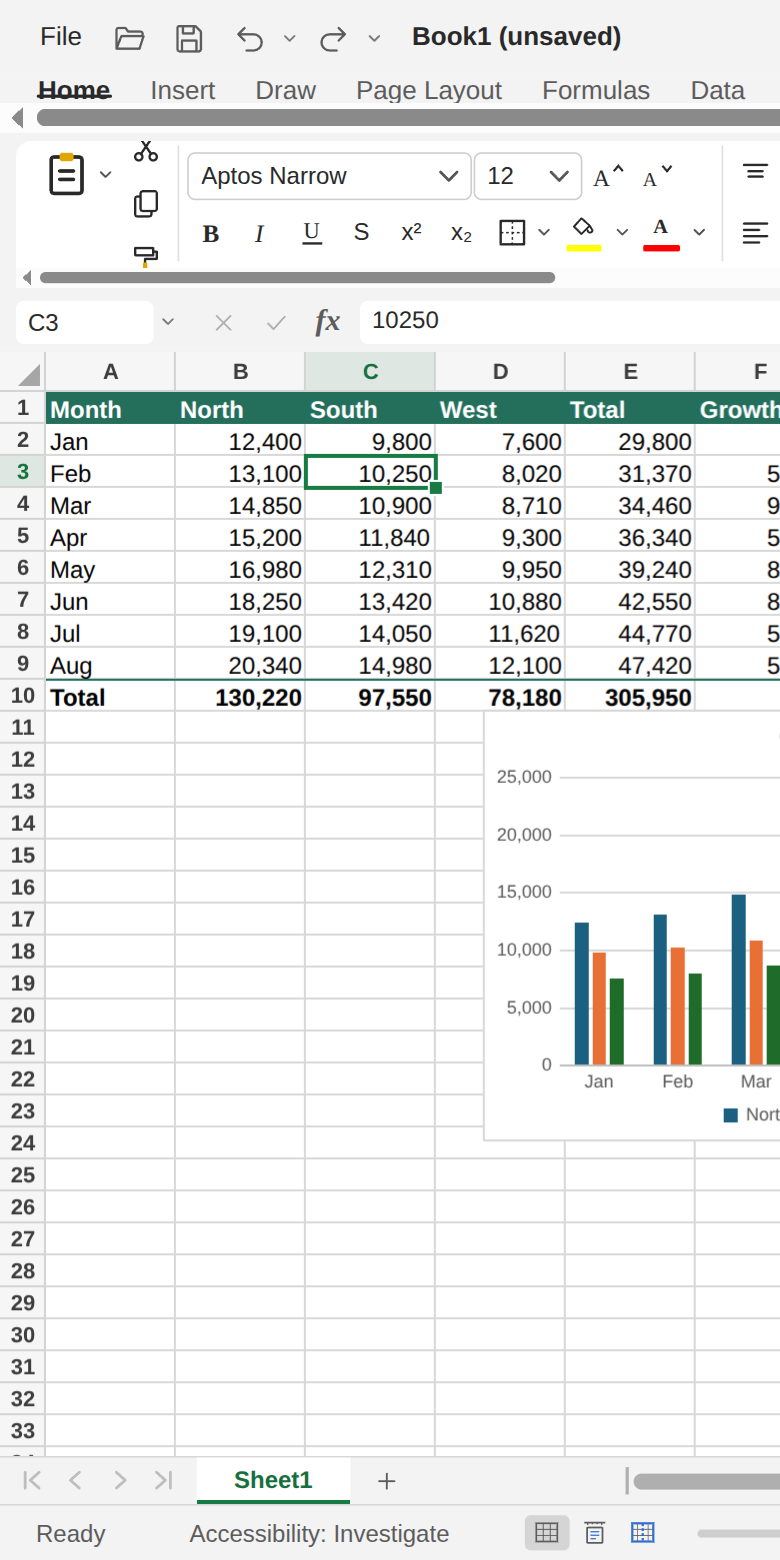
Formulas, charts, PivotTables and page layout, all running in the browser.
-
502 Excel functions
Dynamic arrays and the newer functions are included, and formulas are checked against real Excel results.
- LET
- LAMBDA
- XLOOKUP
- GROUPBY
- PIVOTBY
-
PivotTables and PivotCharts
Summarise data with PivotTables and PivotCharts, and filter them with slicers and timelines.
-
Every chart type
From everyday column and line charts to the specialised ones.
- 3D
- Combo
- Treemap
- Sunburst
- Waterfall
- Funnel
- Filled maps
-
Tables and rules
Tables, conditional formatting, data validation and sparklines.
-
Shapes, notes and comments
187 shapes to draw with, plus notes and threaded comments on cells.
-
Print and PDF
Page layout, print preview and PDF export.
-
Your language
Function names in many languages, with Polish fully covered. The interface comes in English and Polish.
-
Proofing tools
Spell checking and a thesaurus for English and Polish, which keep working offline once downloaded.
-
Accessible
An accessibility checker, screen reader support, keyboard tips and a touch layout.
-
Scripts, not macros
Automate your work with JavaScript scripts. VBA in a file is kept on save but never run.
A6 Offline
Install it once. Use it without a connection.
8sheets installs as an app and keeps working offline. Your files are already on your device, so they are still there without a network.
- Installs as an offline app and opens with or without a network.
- Proofing works offline too: a dictionary is downloaded the first time you use it, then needs no connection.
- A touch layout for phones and tablets.
A7 For developers
A spreadsheet you can put in your own page.
The JavaScript API embeds the full app, or only the parts you choose, in any element. The same workbook also runs in Node with no page at all.
- Embed the whole app or parts of it.
- Run headless in Node to build or calculate a workbook.
- One entry point for both.
import { createWorkbook, mountWorkbook } from './src/api/index.js';

// No page needed; this also runs in Node.
const wb = createWorkbook({ sheets: 2 });
const sheet = wb.activeSheet;
sheet.range('A1').values = [['Item', 'Qty'], ['Pens', 4]];
sheet.range('C2').formulas = [['=B2*2']];
await wb.whenCalculated();

// The full app in any element, which needs a height.
const onPage = await mountWorkbook(
  document.querySelector('#here'),
);
A8 Questions
Asked before opening a file.
Are my files uploaded anywhere?
No. 8sheets runs entirely in your browser. Files are opened, edited and saved on your device, and there is no account, no upload and no server storage.
Which files can it open and save?
Excel workbooks (.xlsx, .xlsm and .xltx) and CSV.
What happens to macros and other things 8sheets does not run?
They stay in the file. VBA projects, Power Query, custom XML and other unknown parts survive a save unchanged. VBA is kept but never run; automation in 8sheets is done with JavaScript scripts.
Does it work without an internet connection?
Yes. After your first visit the whole app is stored on your device, and it installs as an app. Dictionaries and map data are downloaded the first time a feature needs them and then work offline too.
How large a workbook can it handle?
It is tested with 1,000,000 rows by 20 columns. Large workbooks are streamed in a background thread, and the grid only draws what is on screen.
Do my formulas give the same results as in Excel?
8sheets has 502 Excel functions, including dynamic arrays, LET, LAMBDA, XLOOKUP, GROUPBY and PIVOTBY, and its formulas are checked against real Excel results.
Can several people edit a workbook at the same time?
Not yet. Real-time collaboration is coming soon.
Open a workbook. Keep it to yourself.
No account to create and nothing to install first.